
The Money Search Results can be further analyzed using the results Aggregation tool in Julep.
How to use the Aggregation Tool
- Enter your Money Search filter criteria and click
 .
. - Your results will appear on the Results
- In the lower right-hand side of the screen, Julep will calculate the Total amount, the Live Gift Total, and the Soft Credit Total (or memo) of your results.
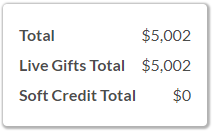
- In the lower right-hand side of the screen, Julep will calculate the Total amount, the Live Gift Total, and the Soft Credit Total (or memo) of your results.
- Click the Aggregation tab to further analyze.
- By default, the results will aggregate the total number of gifts and the total amount based on your search.
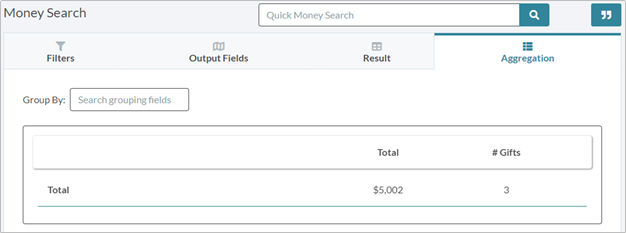
- Click in the Group Byfield to select further aggregation criteria. Filter field options include:
- Bundler
- Fund Code
- People Type
- Payment Method
- Source Code
- State
- Select the field you would like to aggregate by to see results. You can select multiple.
- Results will appear onscreen.
- Click
 while in the Aggregation tab to export your aggregation results. Go back to the Results tab to export your full list of records.
- Click
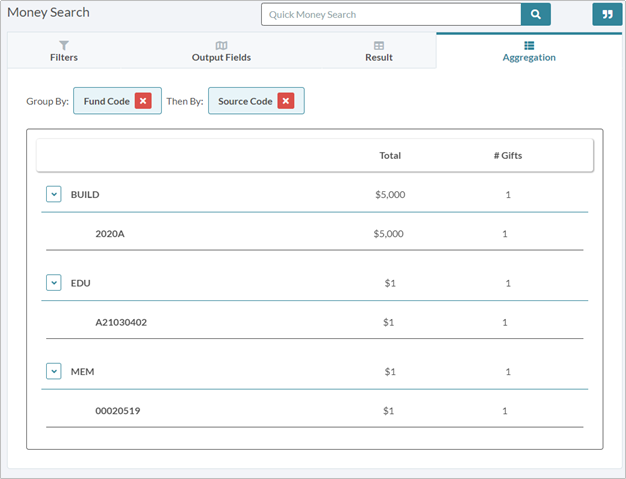
NOTE: Saved Searches will also save Aggregation settings
Comments
0 comments
Please sign in to leave a comment.